

A simple tool to instantly capture your PC screen
Snagit is a lightweight, simple, and useful screen recording software, which lets you take screenshots on a Windows PC. With this program, you can choose a specific area on the computer’s screen and conveniently capture the display. The tool is a good choice for video creators, meme creators, presenters, forum posters, bloggers, journalists, and IT workers. The best part is that Snagit doesn’t affect system resources, and runs smoothly on Windows 10 and 11 machines.
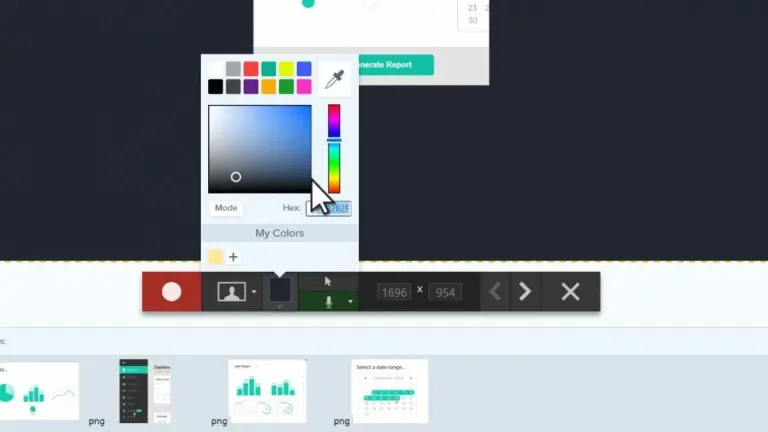
While Snagit has always been a popular software for taking screenshots, Snagit 2022 comes with a range of new features. For instance, the tool comes with picture-in-picture recording, video improvements, Cloud library compatibility, cross-platform file format, cross-platform markup consistency, and performance improvements.
Supports quick screen capture and doesn’t affect system resources
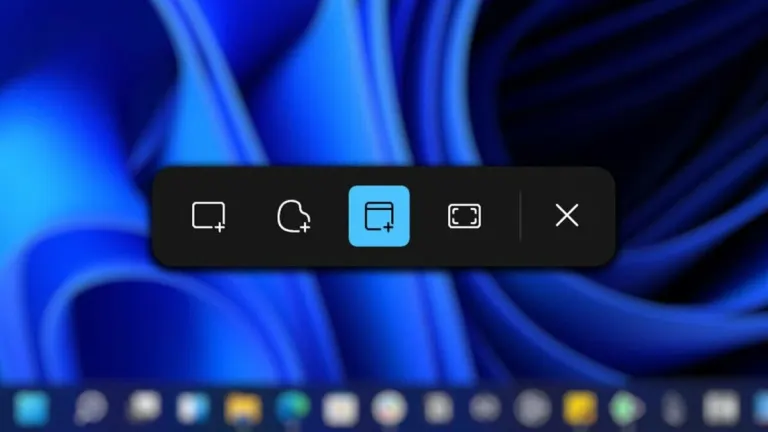
Snagit has been developed by TechSmith, and comes with multiple features to edit output files. The program’s latest 2022 version features some new tools, a simpler interface, and revamped existing editing functionalities. With the simple screenshot capturing feature, the program is a good choice for casual users around the world. The software supports ‘Quick Screen Capture’, which lets you take screenshots instantly. The basic editing features allow you to accentuate the visuals, which can ultimately be included in memes, images, videos, etc.
With this screen recorder, you can capture or edit the computer’s screen with ease. Moreover, the output files can be directly shared over email. It’s worth mentioning that Snagit is a simple tool for Windows computers, and works in a much better way than counterparts like Free Screen Recorder. Unlike other free programs, this one lets you utilize multiple tools to improve screenshots.
What can you do with Snagit?
Apart from the screen recording feature, the tool comes with multiple functionalities, including ‘Combine Images’. It lets you merge captures into a single file. With this program, you can display multiple screenshots in the display, an ideal choice for guides, tutorials, and presentations. You only need to highlight the images you need to merge and choose the ‘Combine’ option from the ‘Template’ section. Snagit also allows you to mark the output files with text, arrows, data, and other elements.
In recent times, several screen capture tools have been introduced online. For instance, CamStudio converts screenshots into videos. On the other hand, Snagit supports more than 2,000 pre-made stamps, which have been divided into different categories, such as cursors, icons, symbols, etc. There’s even a ‘Stamp Search and Browsing’ functionality, which quickly sorts through multiple options in the tool’s library. With just a couple of keywords, you can look for relevant ‘stamps’, easing the overall editing process. Snagit 2022 also lets you store screenshots on the Cloud and access them from different devices.
What about special effects and filters?
Unlike other free tools in this category, Snagit lets you apply special effects and filters. Though the program doesn’t have comprehensive or advanced editing tools, such as Pixlr, it lets you add arrows, grayscale, borders, and text. Since the release, the software hasn’t aimed at giving competition to the professional image or video editors. However, it still comes with a video recording functionality, which also captures the audio from the PC’s microphone.
In case you want to add a specific filter to the screenshots, the screen recorder lets you change certain settings. This way, the program automatically adds the filter whenever you save the output file. With the latest version of the tool, the developer team has tried to solve other challenging aspects of taking screenshots. For instance, you can use the delay timer for grabbing cascading windows. Similarly, you can schedule screenshots at specific intervals, allowing you to reduce repetitive tasks.
With this application, it’s easy to capture whatever is visible on your computer’s screen. There’s a dedicated scrolling feature, which lets you clip taller or wider images. It allows you to capture even an entire webpage. You only need to scroll down, up, or side-to-side to capture the screen’s content. During the editing process, you can add borders, shapes, and several other special effects.
What about the interface?
While Snagit 2022 comes with multiple screen-capturing features, such as arrows, blur, borders, etc., the program has a simple interface. While working with this tool, you won’t be overwhelmed by the choices. Everything you like or frequently use can be added to the ‘Favorites’. This saves a good amount of your time going through multiple functionalities in the menubar and toolbar.
The latest version of the program has a ‘Quick Styles’ option, which gives easy access to various on-screen elements. The software’s interface takes a minimal approach and displays everything in clear icons. You can also set hotkeys, which gives quick access to some useful and commonly-used features. Just a couple of clicks are required to take screenshots, edit output files, and save them to the destination folder.
Which file formats are supported?
While Snagit is a free screen recording tool, it supports multiple file formats, including cross-platform file formats. With the program, you can save the files in GIF, PSD, BMP, SWF, PDF, MHTML, and other prominent formats. The best part about the tool is the integrated GIF creator. It works perfectly for creating short funny videos, memes, and other forms of fun content.
As mentioned earlier, the latest version comes with a simple interface and several improvements. Some new features have also been added to the tool. These include watermark support, color adjustment, highlight, etc. When it comes to PCs running on Windows 10, the program won’t cause any issues. On older computers, it might cause some unexpected lags but works fine most of the time.
Capture the screen, create GIFs, and do a lot more
Compared to other similar platforms available online, Snagit is a well-designed, simple, reliable, and useful app, which works well for capturing your PC’s screen. In addition to this, Snagit 2022 offers various improvements and new features, such as Cloud library compatibility, picture-in-picture recording, and cross-platform markup consistency. Overall, Snagit is a good addition to the set of utilities available on your Windows computer. Just download, install and start using the program from the get-go.
.png)



.png)
.png)
















User reviews about Snagit
by Robert Wright
Another scammy attempt by cheap hucksters. The 'Net is absolutely stuffed full of businesses offering 'freeware' which turns out to be 'free' download. As if anyone has ever had to pay for a download in the entire history of the world wide web. Snagit is touted as freeware but isn't. Even gets reviewed in 'free screenshot software' when the reviewers darn well know it isn't free (hence why they're happy to pocket the payments in commission fees for hiding the truth). Time-wasting dishonest scum, the lot of them. Here on Softonic what is advertised in the search results as a free screen capture software turns out to be on a free trial only: disgusting. Softonic used to have an ethical sense, once upon a time. More
by Harry Kharbanda
it s a great software and good resource and we will be recommending to more contacts
by Hadi Abou Hussein
It is an amazing application that helped me alot in my work.
by Parvaneh Keramat
it is an amazing tool for my project or training purpose showing the steps you need to take for example in excel.
by Kalpesh Savla
its a fantastic tool which anybody can use very easily and the results are fantastic of this application
by James Flaherty
Useful in the extreme when working on an IT Service Desk, using movie & screen shot to provide support with required information. Also fantastic for creating training documentation, i have been using it for years More